


React's new Activity Component

posted by Akash Sarki on 29 December 2025
What is the <Activity> component?
It is a new primitive designed to solve a long-standing trade-off in web development: hiding UI while preserving its state.
- Traditional Method: Using `{isVisible && <Component />}` unmounts the component, causing a total loss of local state, scroll position, and input values.
- CSS Method: Using `display: none` keeps the state but keeps the component "alive," meaning it continues to run expensive effects, timers, and background updates.
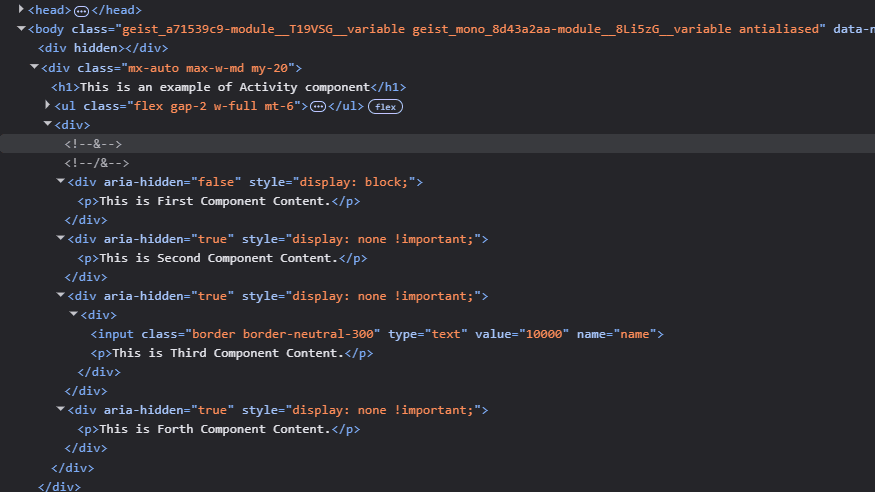
- The <Activity> Way: It provides a middle ground. When you set its mode to hidden, React keeps the component's state and DOM nodes in memory but suspends its effects and lowers the priority of its updates.
Key Features:
- States are preserved and local useState are kept.
- It stays in the DOM with display: none applied.
- useEffect cleanup runs, and setup won't run until visible.
- Updates inside the hidden tree happen at background priority.
How to use it
The syntax is straightforward and uses a mode prop:
import { Activity } from 'react';

function App() {
  const [showSidebar, setShowSidebar] = useState(true);

  return (
    <Activity mode={showSidebar ? 'visible' : 'hidden'}>
      <Sidebar />
    </Activity>
  );
}This is particularly useful for Tab systems, Sidebar menus, and Modals where you want the user to return to exactly where they left off without wasting CPU cycles while the component is out of sight. Note: The contents
Another Example:
"use client";

import { Activity, useState } from "react";

const FirstComponent = () => {
  return <p>This is First Component Content.</p>;
};

const SecondComponent = () => {
  return <p>This is Second Component Content.</p>;
};

const ThirdComponent = () => {
  const [val, setVal] = useState("10000");
  const updateinput = (e) => {
    const value = e.target.value;
    setVal(value);
  };
  return (
    <div>
      <input
        value={val}
        onChange={updateinput}
        type="text"
        name="name"
        className="border border-neutral-300"
      />
      <p>This is Third Component Content.</p>
    </div>
  );
};

const ForthComponent = () => {
  return <p>This is Forth Component Content.</p>;
};

const items = [
  {
    id: "first",
    name: "First Tab",
    component: FirstComponent,
  },
  {
    id: "second",
    name: "Second Tab",
    component: SecondComponent,
  },
  {
    id: "third",
    name: "Third Tab",
    component: ThirdComponent,
  },
  {
    id: "forth",
    name: "Forth Tab",
    component: ForthComponent,
  },
];

export default function Home() {
  const [active, setActive] = useState("first");

  const handleActiveTab = (id) => {
    setActive(id);
  };

  const renderTabs = items.map((item) => (
    <li
      key={item.id}
      className={`flex-1 text-center border-gray-300 border cursor-pointer ${
        active === item.id ? "bg-blue-700 border-blue-500" : "border-gray-300"
      }`}
      onClick={() => handleActiveTab(item.id)}
    >
      {item.name}
    </li>
  ));

  const renderContent = items.map((item) => {
    const isActive = active === item.id;
    const Component = item.component;

    return (
      <Activity key={item.id} mode={isActive ? "visible" : "hidden"}>
        <div
          style={{ display: isActive ? "block" : "none" }}
          aria-hidden={!isActive}
        >
          <Component />
        </div>
      </Activity>
    );
  });

  return (
    <div className="mx-auto max-w-md my-20">
      <h1>This is an example of Activity component</h1>
      <ul className="flex gap-2 w-full mt-6">{renderTabs}</ul>
      <div>{renderContent}</div>
    </div>
  );
}
[!CAUTION] Caveat: Because <Activity> keeps the DOM nodes in the tree, using it for hundreds of heavy components simultaneously can increase your app's memory footprint.It is best used for high-level views or complex forms rather than every small UI element.